In the first part of this series we looked at how to cut events, and I
promised that getting it wrong is never a dead end. This is where I make good on that promise.
Because here is the thing nobody can avoid: requirements change. A field you never needed becomes essential.
A name you thought was fine turns out to be ambiguous. Or you simply learn more about your domain and realize
your first cut was too coarse. In a CRUD world this kind of schema evolution is routine: write a migration,
run an ALTER TABLE, move on. In event sourcing you cannot, because your
events are immutable and your history is meant to live forever.
That sounds like a trap, but it is not. Changing event shapes over time is such a normal part of event
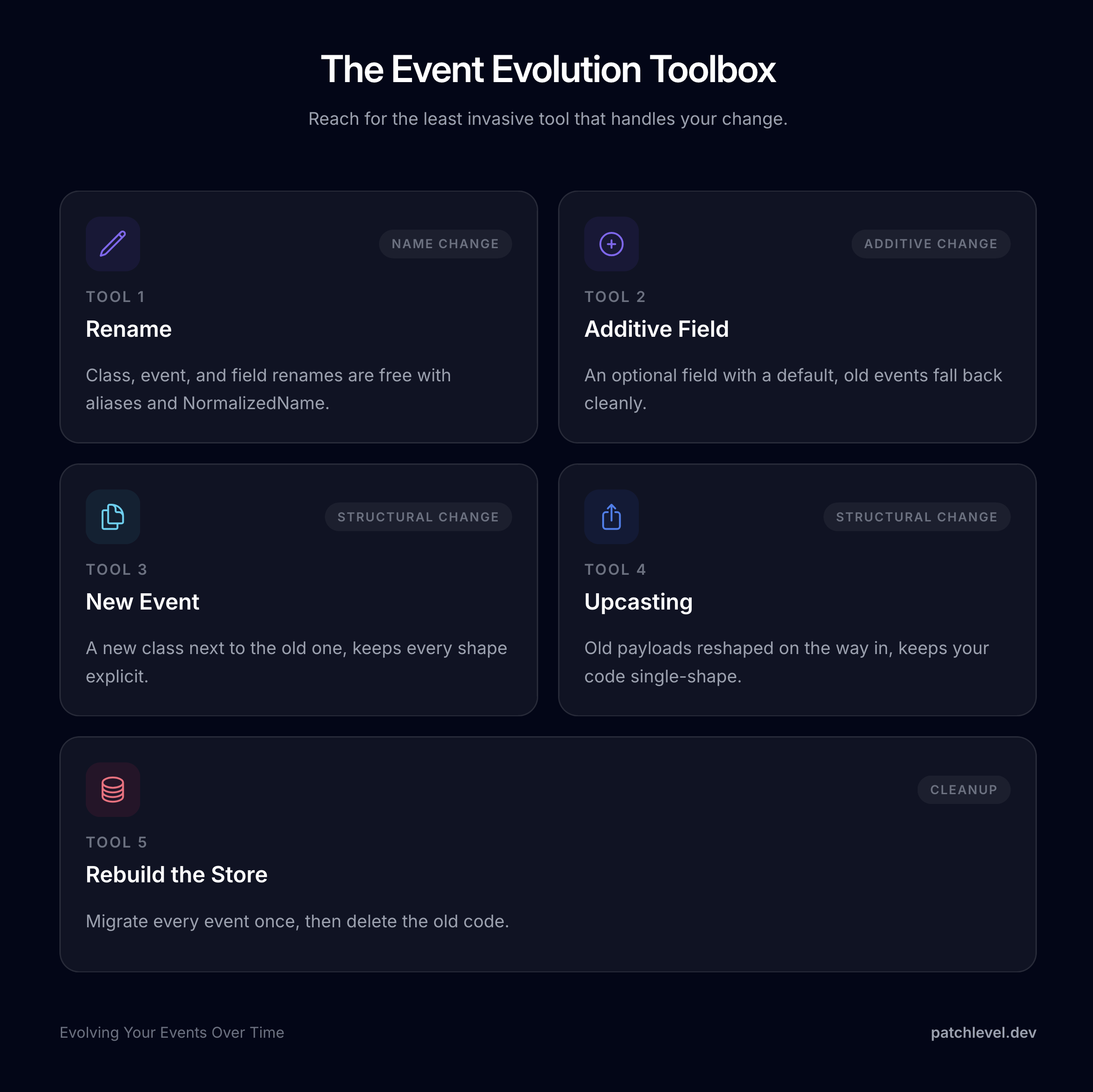
sourcing that it has its own name, event evolution, and a whole toolbox of proven techniques. They are
not rungs on a ladder where each one costs strictly more than the last. They are tools: the change in front of
you narrows down which ones apply, and when more than one fits, the choice comes down to preference. The trick
is simply to reach for the least invasive tool that handles your change. Let me lay the toolbox out using the
customer events from part one.
The one rule you cannot break
Before we touch anything, internalize this: you never mutate events that are already stored. The event
store is append-only, so the bytes on disk for an event that happened last year must keep deserializing
into a valid object forever. Every
technique below respects that rule. We are not editing the past, we are changing how new events look and how
old ones are interpreted on the way in.
With that out of the way, let us open the toolbox.
Tool 1: rename with an alias
The freebie, before any real work starts: renames. The store only ever records the event name, never
the class name, so renaming the PHP class is completely free. Do it whenever you like, no technique required.
If you want to change the event name itself, that is almost as cheap. Events support
aliases. Say our first cut named the event customer.created and
we now want the more precise customer.registered. Change the name and list the old one as an alias:
use Patchlevel\EventSourcing\Attribute\Event;#[Event('customer.registered', aliases: ['customer.created'])]final class CustomerRegistered{ // payload unchanged}
New events are stored under the new name, and old events stored as customer.created still load into the
same class. Your subscriptions are equally unimpressed:
#[Subscribe] references the event class, not the name, so projectors and processors keep running untouched.
The same trick works one level down, on field names. The hydrator stores each
property under a serialized name, and you can pin that name with the
NormalizedName attribute. So you can rename the PHP property while the
stored key stays exactly as it was:
use Patchlevel\EventSourcing\Aggregate\Uuid;use Patchlevel\EventSourcing\Attribute\Event;use Patchlevel\Hydrator\Attribute\NormalizedName;#[Event('customer.registered')]final class CustomerRegistered{ public function __construct( public readonly Uuid $customerId, #[NormalizedName('name')] public readonly string $fullName, // renamed property, same stored key public readonly string $email, ) { }}
Old events stored under the key name still hydrate into $fullName, and new events keep writing name. A
pure rename, no payload change on disk and no technique beyond an attribute.
Reach for the tools below only when the payload itself changes.
Tool 2: add a backward-compatible field
The cheapest change to the payload itself. Sometimes all you need is one more piece of information on an existing event.
Say we want to start recording a customer's locale on registration.
If you make the new field optional, with a default, old events that never had it still deserialize cleanly.
The missing key simply falls back to the default.
use Patchlevel\EventSourcing\Aggregate\Uuid;use Patchlevel\EventSourcing\Attribute\Event;#[Event('customer.registered')]final class CustomerRegistered{ public function __construct( public readonly Uuid $customerId, public readonly string $name, public readonly string $email, public readonly string|null $locale = null, // new, backward-compatible ) { }}
No migration, no new event, no special handling. Old customer.registered events load with locale as
null, new ones carry the real value.
Your subscriptions get the same deal. A projector subscribed to CustomerRegistered simply starts seeing the
new field, null for historical events. If the read model should carry the new column, add it and rebuild the
projection by bumping its subscriber ID, say customer_1 to customer_2; the subscription engine creates a
new subscription and replays the history from the beginning. Just do not expect backfilled values: for
old registrations the information simply never existed.
The catch: this only works for purely additive changes. The moment you need to rename a field, change its
type, split it, or make it required, a default is not enough. For that we reach for the next tool.
Tool 3: a new event, keep the old one
Let us make a real structural change. We decide that a single name field was a mistake and we want
firstName and lastName instead. That is not additive, so we cannot patch the existing event in place.
The classic move is event versioning in its most literal form: introduce a new event next to the old one
and leave the history untouched. The aggregate learns to apply both, but only ever records the new one going
forward.
use Patchlevel\EventSourcing\Aggregate\Uuid;use Patchlevel\EventSourcing\Attribute\Event;#[Event('customer.registered')]final class CustomerRegistered // old shape, still here for the history{ public function __construct( public readonly Uuid $customerId, public readonly string $name, public readonly string $email, ) { }}#[Event('customer.registered_v2')]final class CustomerRegisteredV2{ public function __construct( public readonly Uuid $customerId, public readonly string $firstName, public readonly string $lastName, public readonly string $email, ) { }}
In the aggregate you keep an apply method for each, so both old and
new events rebuild the same state:
New registrations record CustomerRegisteredV2, old events keep working. This is correct and safe, and for a
one-off change it is perfectly fine.
If both events end up rebuilding the state the same way, you do not even need two apply methods. A single one
with a union type can handle both:
#[Apply]protected function applyCustomerRegistered(CustomerRegistered|CustomerRegisteredV2 $event): void
And the aggregate is not the only reader of the new event. Every subscriber that cares about registrations must now
subscribe to both classes and cope with both shapes. You can also put it into one method with a union type:
#[Subscribe(CustomerRegistered::class)]#[Subscribe(CustomerRegisteredV2::class)]public function onCustomerRegistered(CustomerRegistered|CustomerRegisteredV2 $event): void
But you can feel the problem already. Do this a few times and _v2 becomes _v3 and _v4, each version
adding another event class and another round of apply and subscribe methods that all do nearly the same
thing. The code carries every historical shape forever, in the aggregate and in every subscriber.
To be fair, that can also be a feature. The versioned classes are an explicit record of how your model
evolved: every shape the business ever produced is still visible in the code, and each version keeps its own
apply logic for the time when old events genuinely meant something different. If that history is valuable to
you, staying with a new event per version is a perfectly reasonable choice.
Tool 4: upcasting
The new-event approach keeps every historical shape explicit, but the flip side is that you carry two event
classes and two apply methods forever for one structural change, and each further change adds another pair. If
you would rather your code only ever describe the current shape,
upcasting is the other tool for exactly this change. Neither is
simply better: the new event keeps the past visible in your code, the upcaster keeps your code small. It is a
genuine trade, and which side you value is up to you.
An upcaster reshapes the stored payload on the way in, before it is deserialized into an object. That lets
you keep a single, current event class and transform old payloads into its shape at load time. So we drop
CustomerRegisteredV2, redefine CustomerRegistered to the new shape, and write an upcaster that turns the
old name payload into firstName and lastName:
use Patchlevel\EventSourcing\Aggregate\Uuid;use Patchlevel\EventSourcing\Attribute\Event;#[Event('customer.registered')]final class CustomerRegistered // the one and only shape your code knows{ public function __construct( public readonly Uuid $customerId, public readonly string $firstName, public readonly string $lastName, public readonly string $email, ) { }}
use Patchlevel\EventSourcing\Serializer\Upcast\Upcast;use Patchlevel\EventSourcing\Serializer\Upcast\Upcaster;final class SplitCustomerNameUpcaster implements Upcaster{ public function __invoke(Upcast $upcast): Upcast { // ignore every event we do not care about if ($upcast->eventName !== 'customer.registered') { return $upcast; } $payload = $upcast->payload; // already in the new shape, nothing to do if (!array_key_exists('name', $payload)) { return $upcast; } [$first, $last] = array_pad(explode(' ', $payload['name'], 2), 2, ''); unset($payload['name']); $payload['firstName'] = $first; $payload['lastName'] = $last; return $upcast->replacePayload($payload); }}
Then you register it on the serializer, using an UpcasterChain when you have more than one:
use Patchlevel\EventSourcing\Serializer\DefaultEventSerializer;use Patchlevel\EventSourcing\Serializer\Upcast\UpcasterChain;$serializer = DefaultEventSerializer::createFromPaths( ['src/Domain'], new UpcasterChain([ new SplitCustomerNameUpcaster(), ]),);
Now there is exactly one CustomerRegistered class and one apply method. Old events flow through the upcaster
and arrive in the new shape, new events already match. Your domain code never has to know that two versions
ever existed.
And because the upcaster sits in the serializer, this holds everywhere events are loaded, subscriptions
included. Projectors and processors subscribe to the one class and receive the one shape, no duplicated
subscribe methods like in tool 3. The only thing upcasting does not do for you is fix read models that
already stored the old shape: if the projection table has a single name column and should now have two,
the upcaster will not rewrite that table. Change the projection code and rebuild it the same way as in tool 2,
replaying the now-upcasted history.
For most of the design mistakes you make early on, this single technique is enough, and it is why I told you
in part one not to fear a wrong first cut.
The only downside is that the upcaster runs on every single load, forever, and the transformation code stays
in your codebase as long as old payloads exist in the store. Which brings us to the last tool.
Tool 5: clean up by rebuilding the store
The old payloads still sit in the store in their old shape. After a while you may want to retire the upcaster
entirely, and you can, by rebuilding the store in a one-time event migration.
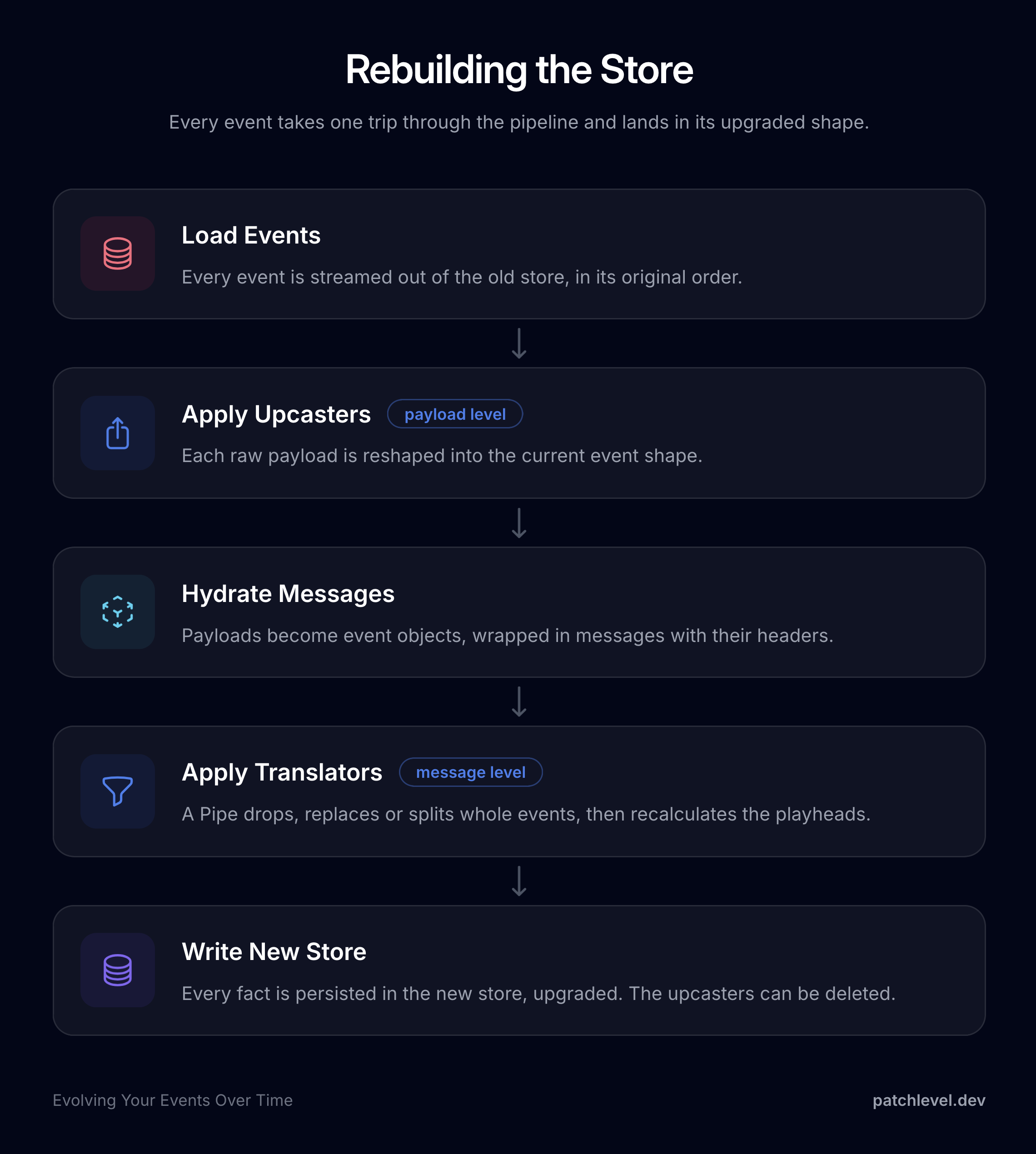
The idea is simple: read every event out, run it through the upcasters once, and persist it in its upgraded
shape, copy-and-transform in the most literal sense. Note that nothing is lost or discarded here. Every historical fact is preserved in the exact same order,
it is just stored in the new shape instead of being reshaped again on every future read. Remember that
extraction always writes the current shape, so once an event has passed through the upcaster and been written
back, its stored payload is already up to date.
During such a rebuild you have a second tool at your disposal: translators.
It is worth being precise about how they differ from upcasters, because they operate at different levels. An
upcaster reshapes a single raw payload on the way in, one payload in, one payload out, and it runs
automatically on every load. A translator works one level up, on the fully hydrated message, and it runs
as part of a deliberate migration pass while you rebuild. Because it sits at the message level, a translator
can do things an upcaster structurally cannot: drop an event entirely, replace one event with another, or split
a single event into several. Say an early one-off import left LegacyCustomerImported events in the stream
that nothing reads anymore; a rebuild is the moment to drop them. You chain translators in a Pipe and stream
the whole store through it:
use Patchlevel\EventSourcing\Message\Pipe;use Patchlevel\EventSourcing\Message\Translator\ExcludeEventTranslator;use Patchlevel\EventSourcing\Message\Translator\RecalculatePlayheadTranslator;$messages = new Pipe( $messages, new ExcludeEventTranslator([LegacyCustomerImported::class]), new RecalculatePlayheadTranslator(),);
Whenever a translator adds or removes events it breaks the ascending playhead the store relies on, which is why
the RecalculatePlayheadTranslator runs at the end to renumber the stream back into a valid order. So a rough
rule of thumb: reach for an upcaster when the shape of a payload changes, and for a translator when the
set or ordering of events itself changes.
The replace ability is also how you retire the versioned events from tool 3. If you took that path and ended up
with a CustomerRegisteredV2 sitting next to the original CustomerRegistered, a rebuild is where you collapse
them into one. A ReplaceEventTranslator maps every old event
to its current counterpart, so once the migration has run only the current class is left in the store and the
old one can be deleted:
use Patchlevel\EventSourcing\Message\Translator\ReplaceEventTranslator;new ReplaceEventTranslator(CustomerRegistered::class, static function (CustomerRegistered $old) { [$first, $last] = array_pad(explode(' ', $old->name, 2), 2, ''); return new CustomerRegisteredV2($old->customerId, $first, $last, $old->email);});
Whether you went the upcaster route or the versioned-event route, the rebuild is the moment all that accumulated
compatibility code finally disappears.
Configuring it in Symfony
The bundle wires this up for you. You register the target
store under store, list your translators there, and the bundle gives you a event-sourcing:store:migrate
command that streams the old store into the new one through those translators:
The entries under translators are service ids. A stateless translator like RecalculatePlayheadTranslator
autowires under its class name, while one that takes constructor arguments, like ExcludeEventTranslator, needs
a service definition, here under its own FQCN, so the argument list is supplied.
Configuring it in Laravel
The Laravel package offers the same in
config/event-sourcing.php: enable migrate_to_new_store on the store and list your translators, and you get
the matching artisan command:
use Patchlevel\EventSourcing\Message\Translator\ExcludeEventTranslator;use Patchlevel\EventSourcing\Message\Translator\RecalculatePlayheadTranslator;return [ 'store' => [ // ... your current store 'migrate_to_new_store' => [ 'enabled' => true, 'type' => 'dbal_stream', 'options' => ['table_name' => 'my_stream_store'], 'translators' => [ ExcludeEventTranslator::class, RecalculatePlayheadTranslator::class, ], ], ],];
php artisan event-sourcing:store:migrate
The translators entries are resolved through the container, so here ExcludeEventTranslator gets its event
list from a binding in a service provider:
$this->app->bind( ExcludeEventTranslator::class, static fn () => new ExcludeEventTranslator([LegacyCustomerImported::class]),);
Whichever framework you are on, set the old store to read-only while you migrate (read_only: true in
Symfony, 'readonly' => true in Laravel), and be sure the new store uses a different table name, otherwise
you overwrite the very history you are trying to preserve.
Subscriptions deserve a moment of planning here too. The subscription engine tracks each subscriber's position
in the event stream, and after a rebuild those positions refer to the old store; events may have been dropped
and playheads renumbered. So treat the migration as a fresh start for the read side: rebuild your projections
against the new store, and take care with processors that have side effects, like sending mails. You want
those to continue from the tip of the new stream, not replay years of history.
Once that is done, the old name payloads no longer exist anywhere, which means you can delete the
SplitCustomerNameUpcaster and any leftover compatibility code. The accumulated debt from tools 3 and 4 is
paid off, and your codebase only describes the world as it is today.
Think of this as the optional finishing step. You do not have to take it. Plenty of systems happily keep their
upcasters running for years. But when the list of upcasters grows long enough to bother you, rebuilding the
store is how you reset to a clean slate without losing a single fact.
Which tool should I pick?
The whole point of a toolbox is to reach for the least invasive tool that handles your change.
Only a name changes, class, event, or field? Tool 1, renames are free with an alias or NormalizedName.
The change is purely additive? Tool 2, add an optional field and you are done.
The payload structure changes? Now you have a real choice. Reach for tool 3, a new event, when you want
every historical shape to stay explicit in your code, or tool 4, upcasting, when you would rather your
domain only ever see the current shape.
The upcasters or versioned events have piled up and you want a clean store? Tool 5, rebuild and delete the old code.
Most day-to-day evolution is handled by an optional field or an upcaster. The rest are there for the cases
that need them.
Wrap up
Immutability of events is not a cage, it is a guarantee, and evolving your events is a normal, well supported
part of working with event sourcing. Add a backward-compatible field when you can, and when the structure
really changes, pick the tool that fits, an explicit new event or a transparent upcaster, then rebuild the
store when you want to tidy up for good. And whatever tool you reach for, remember that the aggregate is not
the only reader of your history: your projections and processors come along with you.
Put this together with the first part and the picture is complete: cut your
events along the decisions your business actually makes, and when reality moves on, evolve them with the tool the change calls for.
You are never stuck with your first decision, so you can start designing today without the fear of getting it
perfect.